Bill the hotel and pay the cleaners
Per-room rates, tracked hours, and the invoice that comes out of both.
4:15
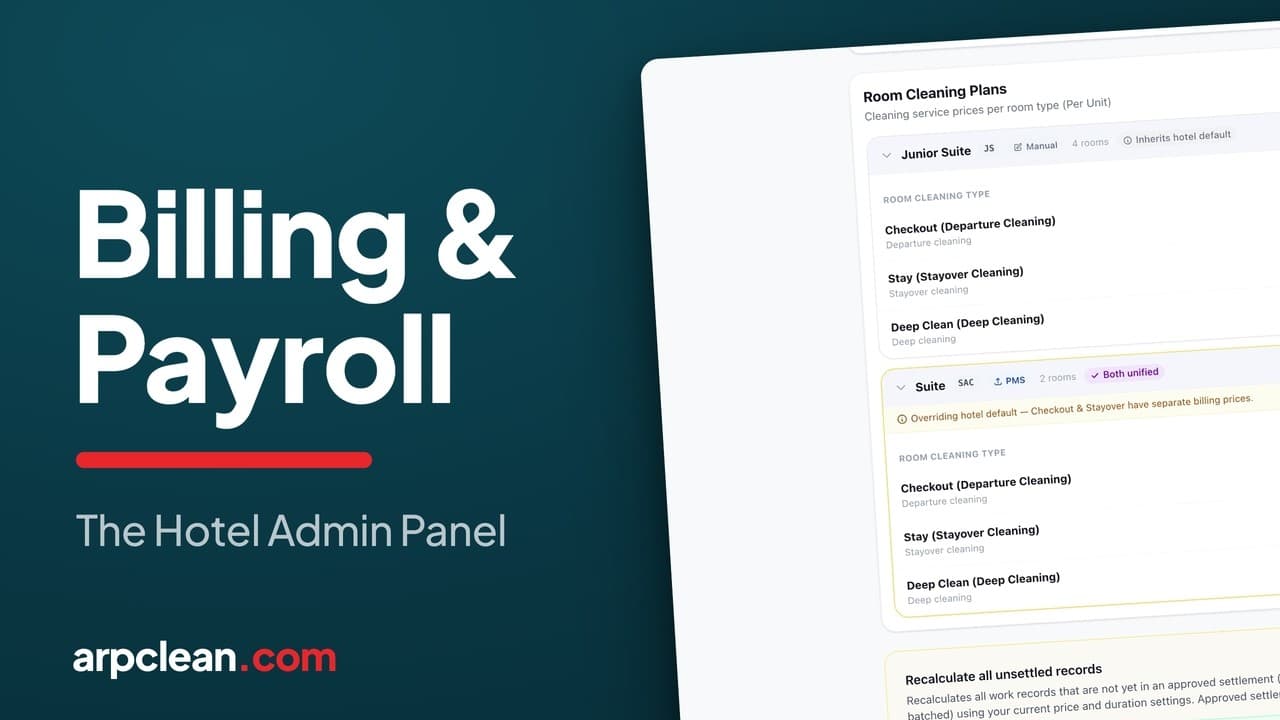
What you will see
- The two columns under Service Plans: what the hotel is billed per room, what the cleaner is paid
- The calculator that turns a duration into pay, or pay into a duration, from one company-wide rate
- Recalculating prices mid-month without touching anything already invoiced or paid
- The tiered surcharge that appears on the invoice when guests skip the daily clean
How to bill hotel cleaning per room
Every cleaning task in ARPCLEAN carries two numbers, and they are rarely the same figure. One is what the hotel owes for that room. The other is what the job is worth to the person who cleaned it.
Both live under Service Plans in the Hotel Admin panel, and both come out of a single task the moment a housekeeping manager signs it off. Nobody enters the work twice.
Two columns, two audiences
Under Room Services a hotel picks the cleaning types that apply to it. In the walkthrough that is Checkout, Stay and Deep Clean, while Check-in and Turn Down stay off. The choice carries through to the Hotel Operations Panel and to the cleaners' phones, so a type nobody switched on never reaches the floor.
Each active type then gets a priced line under every room type, split in two. Hotel Billing is the per-room amount the hotel is charged. Employee Payroll is the duration that counts toward the cleaner's pay.
You do not price all of that by hand. Stay can inherit the Checkout price outright, and Deep Clean can be set as a multiple of it, which the walkthrough puts at double. Change the underlying figure and everything tied to it follows. Add-ons that arrive from the PMS, an extra bed or a baby bed, use the same two columns but price per unit rather than per room. Inspection charges are flat across room types, and a Pre-check price can simply mirror the Post-check one unless the hotel decides otherwise.
From a duration to a wage, and back
A calculator icon sits beside every duration field. It opens the Work Duration Calculator, which moves between time and money in either direction.
By default it takes the effective hourly rate from your company settings, though any single hotel can set its own. Enter twenty minutes and it shows what that earns. Enter a speed instead, three cleanings an hour say, and it works out the minutes. Enter the wage you want and it solves for the duration. Whichever field you touch, the others follow.
That calculator lives inside the product and works on prices you have already set. For a first estimate before any of that exists, how many room attendants a day needs and what one occupied room costs to clean, our free housekeeping cost calculator works only from the numbers you enter.
A worked example: minutes, wage, invoice
Say a checkout in a standard room is planned at 30 minutes and the cleaner's rate is €15.00 an hour. The payroll line for that room is €7.50. With per-room pay it stays €7.50 whether the room took 24 minutes or 36, because the planned time counts, not the clock.
If the hotel is billed €12.50 for that checkout, €5.00 is left before employer contributions and overheads. A stay room planned at 20 minutes pays €5.00 at the same rate.
On a public holiday or another special day set for that hotel, pay is multiplied by 1.5 unless you change it, so the same checkout pays €11.25. The hotel price stays where it is unless you set a billing multiplier as well.
Where a minimum hourly wage applies, per-room pay still has to reach it for the hours actually worked. ARPCLEAN records when each room was started and finished, so you can hold the two side by side.
Changing prices without disturbing what is settled
Nothing has to be right on day one. A hotel can launch on placeholder numbers, start running its operation, and come back to pricing when the month closes, or the moment a rate changes partway through one.
One button then recalculates every record that has not been billed or paid. Anything already inside a signed-off settlement, or typed in by hand, is left alone. ARPCLEAN shows you which records would move before you commit, so a mid-month correction cannot quietly rewrite an invoice line or a wage slip that someone has already approved.
Hourly work: lobbies, kitchens, the dish line
Not everything is priced per room. Common areas, the kitchen and the dish line are paid by the hour, through what ARPCLEAN calls shift plans.
A shift plan holds a set number of hours, a fixed break and the hourly rate the hotel is billed. The people on the shift are paid at their own hourly rate. A team leader books people into those shifts a week at a time. Once the hours are approved they join the same settlement run as the per-room work, so hourly and per-room staff land on one invoice and one payroll rather than two.
The surcharge when a guest skips the clean
A guest who turns down housekeeping for the night does not make that room free to service. The staff were rostered and ready. ARPCLEAN puts a step-based surcharge on the invoice base instead of absorbing the cost.
How high it climbs depends on the share of room-nights skipped over the period, against thresholds your company sets and any hotel may adjust for itself. Take the walkthrough's own figures: a hundred room-nights cleaned, twelve skipped, an invoice base of two thousand five hundred. Twelve percent is enough to reach the top threshold, and the surcharge prints as its own line on the bill.
One task, two records
Set a price and a duration once. From then on, whatever the housekeeping manager signs off writes to the hotel's invoice and to that employee's pay at the same moment, out of the same record. No second entry, and no spreadsheet reconciling the two afterwards.
None of this is an add-on, in the same way that a hotel's Oracle Opera Cloud export carries no setup charge. Billing and payroll are part of the ARPCLEAN subscription. See current prices.
Frequently asked questions
That is set per employee. On per-room pay the planned time for the task counts, however long the room took. On hourly pay the recorded working time counts, with breaks taken out. The same company can run both, and one person can have per-room tasks and hourly shifts in the same month.
One button recalculates every record that is not yet settled, and it shows which records would change before you confirm. Records in an approved, exported or paid settlement stay as they are, and so do entries a team leader typed in by hand.
Payroll comes out as CSV, Excel and PDF and as a DATEV booking file. Each hotel gets its own PDF with the invoice lines, VAT at 19% by default and a running invoice number per hotel.
ARPCLEAN divides the skipped room-nights by the cleaned ones for the period. By default nothing is added below 5%, 3% of the room-cleaning invoice base from 5% and 5.2% from 10%. With 12 skipped against 100 cleaned and a base of €2,500, the surcharge line is €130. Your company sets the steps and any hotel can adjust them.
Special days are set per hotel, by hand or from a calendar import. By default pay is multiplied by 1.5 and the hotel price stays at 1.0. Both factors can be changed, and an employee group can have its own.
Going deeper
Watch next
News on this topic

Fairmont Hotel Vancouver staff approve three-year deal with 10% to 23% pay raises
For housekeepingCompare your Vancouver room attendant pay and room workloads against this new three-year hotel union deal.
3 min
Ontario WSIB cuts 2027 average premium to $1.18 for every $100 of insurable earnings
For housekeepingCheck your 2027 WSIB rate statement in November before updating labor cost per room in Ontario contracts.
3 min
US producer prices up 6.3 percent year over year in September, largest gain since 2022
For housekeepingFind which PPI series your cleaning contract's price clause cites before the next adjustment date.
3 min
Run your housekeeping the way this guide shows
30-day trial with every feature open. No credit card required, and without a payment method nothing is charged when it ends.
Start free trial