The cleaner's day on their own phone
How a cleaner works through 25 assigned rooms: rushes first, two taps per room, and a list that updates on its own.
6:09
What you will see
- Reading the room list: checkouts, stays, rushes, and guests still in the room
- Closing a room and its linked extra services with one tap
- Handling Do Not Disturb, Service Refused, and Skip Clean without losing a room
- Reporting a maintenance issue with a photo, straight from the room
- Notes and re-clean reasons arriving in the cleaner's own language
What a housekeeping app for cleaners has to do
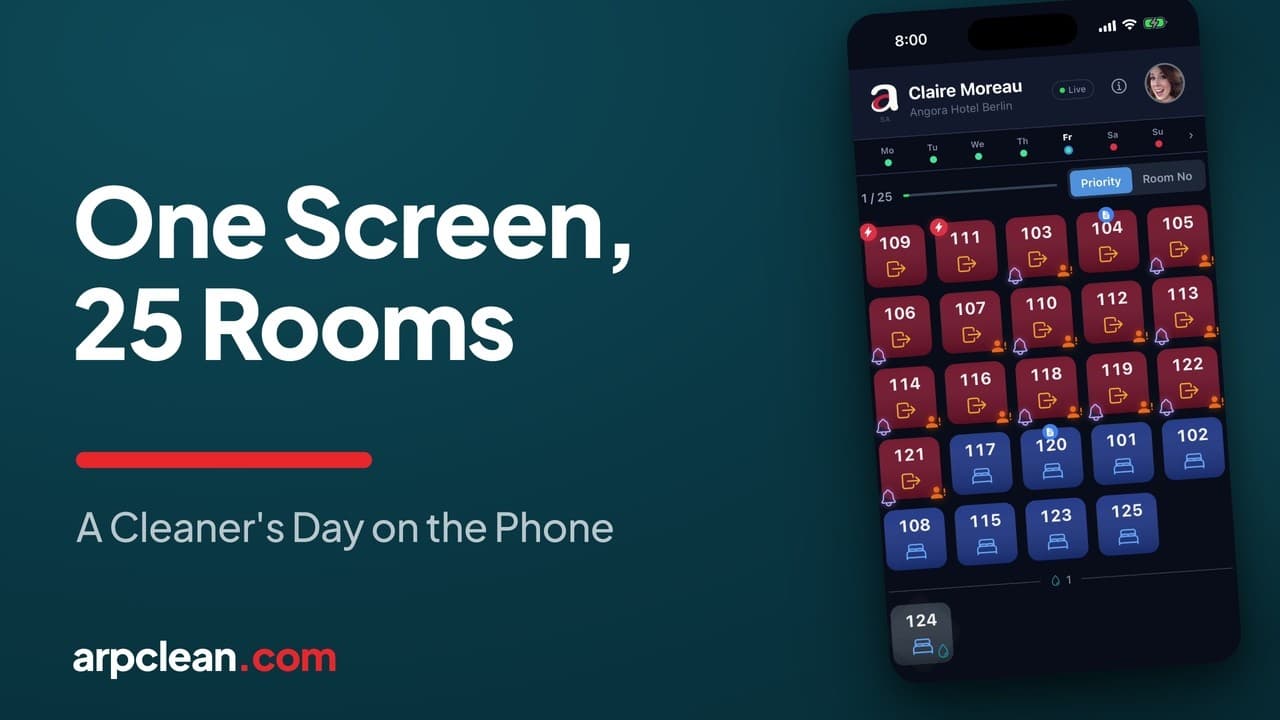
A cleaner does not need a dashboard. She needs to know which rooms are hers, which one comes first, what is special about each door, and what happened while she was inside the last one. The video above follows Claire, who cleans 25 rooms in a Berlin hotel, through a full Friday shift in the ARPCLEAN attendant app. Her phone starts the day empty; when the team leader releases the plan, her list appears on its own, and from then on the whole shift runs on that single screen.
This guide writes down the rules behind what the video shows: how the list is read, what the two taps do, and how the awkward cases behave, from a sign on the door to a room that comes back.
Reading the room list
Each room is a tile, and the tile answers the first questions before the door is reached. Red means a checkout clean, blue a stayover. A small figure on the tile warns that the guest has not left yet. A lightning icon marks a rush the front desk wants first, and a note icon promises a message from the team leader. The list can be ordered two ways: Priority follows the hotel's urgency, Room No follows the corridor. Rooms the hotel system has excluded, such as one flagged Skip Clean overnight, arrive already parked at the bottom, and the day's counter accounts for them from the start.
Two taps per room
The everyday case is deliberately small. Open the room's tile, and when the work is finished, close it with the Cleaning Done button. The tile switches to gold, the colour of a finished clean awaiting its check. When the team leader or a checker passes the room, it turns green and gets a double tick, with no involvement from the cleaner. If a room carries a linked extra service, say two extra beds to set up, a single combined button closes the cleaning and the service together. The service line even shows the hotel's own PMS wording in brackets, so the front desk and the cleaner are reading the same words.
Progress needs no reporting either. When a guest leaves, the guest badge disappears from the tile on its own, and checked rooms turn green while Claire is somewhere else entirely. Nobody calls her, and she calls nobody.
Notes in the cleaner's own language
The note behind the icon on a tile is written by the team leader in whatever language he works in, and it is displayed in the language the cleaner chose. In the video, a warning about a spilled drink reaches Claire in her own words before she opens the door. The same translation applies to re-clean reasons later in the day. ARPCLEAN carries thirteen languages, which is what makes a mixed team workable without phone calls.
Signs on doors: Do Not Disturb without losing rooms
A Do Not Disturb sign never deletes a room; it reroutes it. One tap on Do Not Disturb moves the room out of the active list into the strip at the bottom, and the counter continues without it. What happens next depends on the job type. A stayover behind a sign is simply skipped for the day. A checkout still has to be cleaned before the next arrival, so it stays parked below until the sign disappears; then Cancel DND puts it back to Not Started. And when a guest checks out at reception, the app clears the sign by itself, so a room can resolve without the cleaner ever touching it.
Two neighbouring cases get their own buttons. When a guest is present and declines the clean without a sign on the door, the honest state is Service Refused, and the entry stays reviewable: reception or the team leader can pull the room back should the guest reconsider. And in hotels that run a green program, a card on the door means the guest chose to skip today's clean for a benefit on the next stay; the Skip Clean button books exactly that, while hotels without the program never see the button at all.
Reporting a problem from inside the room
A dripping tap does not interrupt the shift. Report Issue opens a short form: a category such as Maintenance Required, a line of description, and a photo taken on the spot. The technician has the report before the bathroom is finished, the room still gets cleaned, and the tile keeps the issue marker so the problem is not forgotten once the room itself is done.
When a room comes back
A checked room can be rejected. In the video, a room returns late in the day marked Re-Clean Required with the reason, trash not removed, shown in Claire's language. She fixes it, taps the same done button again, and the room goes back into the checking flow. The check itself and what the team leader sees on his side are covered in the inspection guide; how the morning list was distributed in the first place is the room assignment guide.
The end of the shift
By mid-afternoon every tile on the list is green, and the handful in the bottom strip, the signs, the refusal, the skipped cleans, are still on the record rather than lost. Together the two groups account for all 25 assigned rooms. The last screen of the day is My Schedule, where the week the team leader planned is already waiting: working days, free days, and a mark on the current day. There is no printed list at the start of the shift and no board in the basement at the end of it.
Going deeper
Watch next
Related guides
- Run the housekeeping day
- Manage housekeeping from your phone
- Assign rooms to cleaners
- Inspect rooms and record quality
- Run staff, shifts, and schedules from a phone
Run your housekeeping the way this guide shows
30-day trial with every feature open. No credit card required, and without a payment method nothing is charged when it ends.
Start free trial